FlexApp One - Custom Shortcut Menu Directory for Start Menu
Answered
Currently we are unable to customize where the shortcut goes in the start menu. I would like to put it in a particular folder.
-
Official comment

Hi John, Windows no longer shows folder within the start menu unless it contains more than one shortcut. This is not something we are able to control beyond adding a second shortcut in the same folder. Hope this helps!
-
Hello Steven, your first comment state on how to add the shortcut to a specific folder. Your second comment said it is something you are unable to control. Does this mean it can or cannot be specify?
If it can be done, would the below be correct? I just removed the "--system" and replaced it with "–addtostart “Start Menu\Programs\BCBSAZ Applications”
C:\ProgramData\Liquidware\ProfileUnity\Cache\FlexAppOne\$($appFile.Name)`" –addtostart “Start Menu\Programs\BCBSAZ Applications” --ctl --skipactivation --hidetray --startup
0 -

The --addtostart parameter does not accept arguments. It simply places a shortcut to FA1 in Start Menu\Programs\FlexAppOne. If you're using Windows 11 and only have a single FA1, you'll not see the FlexAppOne folder when using --addtostart because, as Steve mentioned, folders that contain a single shortcut are not displayed in the Start Menu on Windows 11. If you publish another FA1 with the --addtostart parameter, you'd see a FlexAppOne folder in the Start Menu at that point, containing a shortcut for both FA1 packages.
Program folders in the Start Menu, specific to a package, are created if the associated package itself contains a shortcut in that location and is played back when using --ctl. Again, just like with the FlexAppOne Start Menu folder, if the package has a Programs folder in Start Menu, it will only be displayed if it contains more than one shortcut.
What you can do is create an identically named folder under Programs in each FA1 package, each containing a shortcut for the respective package, and when played back, the shortcuts for all packages should show up under that folder in the Start Menu. Example below of two separate FA1 packages played back - Notepad++ and 7-zip.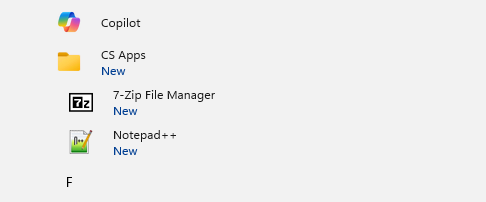 0
0 -
I'm sorry - I missed the FlexApp One detail! To explain further:
Using --CTL, you should see the shortcuts created in their native location within the Start Menu - So if the package was captured with more than one shortcut within a Start Menu\Programs\<Folder> then this will be reflected upon activation. The example I have on my own system is my FlexApp One of PuTTY - The full installer for putty has all of the shortcuts in their own folder and this folder is reflected in my start menu when activated as a FlexApp One using --CTL.
Using --ADDTOSTART is only meant to put them all within a "FlexApp One" folder, I would say you're more likely to want to use just --CTL.
Hope that helps!
0
Please sign in to leave a comment.
Comments
4 comments