
Problem:
Some files are not saved at logoff with ProfileUnity Portability - locked files.
Some files can be locked by some processes and these processes need to be stopped before the files can be saved with the Portability engine.
Resolution:
In 6.5 there is an option to unlock the files by killing the processes. It can be accomplished by editing LwL.ProfileUnity.Client.exe.config file.
1. Open LwL.ProfileUnity.Client.exe.config - It can be found here...
- If your ProfileUnity is installed in the base image, please navigate to C:\Program Files\Profile Unity\Client.net.zip on your base image.
- If your ProfilUnity is not installed in the base image, please navigate to your ProfileUnity netlogon folder and open Client.net.zip
2. Find the following section of the code.
<setting name="PortabilityUnlockFiles" serializeAs="Xml">
<value>
<ArrayOfString xmlns:xsi="http://www.w3.org/2001/XMLSchema-instance"
xmlns:xsd="http://www.w3.org/2001/XMLSchema">
<string />
</ArrayOfString>
</value>
</setting>
3. You can add directories to unlock following the example below. ProfileUnity will search for a process locking the specified files and it will terminate that process before saving the files.
<setting name="PortabilityUnlockFiles" serializeAs="Xml">
<value>
<ArrayOfString xmlns:xsi="http://www.w3.org/2001/XMLSchema-instance" xmlns:xsd="http://www.w3.org/2001/XMLSchema">
<string>C:\Directory\sub-directory</string>
</ArrayOfString>
</value>
</setting>
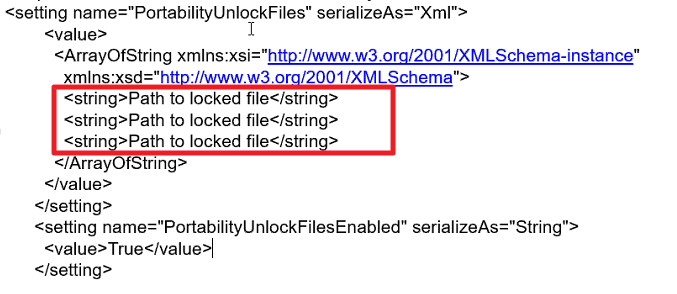
NOTE: It is possible to add multiple entries just by adding another <string> line per the example below.
Product: ProfileUnity
Product Version: 6.5+