
Problem:
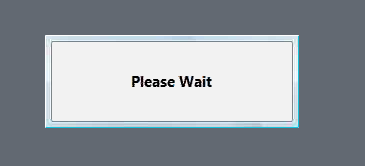
Logon issue - " Please wait " Gray window slows down the logon process
Symptoms:
The following window is showing after profile unity completes the logon process.
Possible Resolution(s):
- Open ProfileUnity console
- Go to "Portability Management"
- Edit " Windows Appearance" Ruleset
- Add following line:
- Operation: Merge
- Scope: Tree
- Hive: HKCU
- Path: Control Panel\Appearance
5. Save,
Example:

Download "Default.ini" to "netlogon\profileunity" directory.
Note: This change will require one logon and logoff to take effect.
From QA:
|
VM |
ProU Status |
VMWare |
VMware 3D Enabled |
Windows Appearance Ruleset |
30-Second |
|
WIN7 |
OFF |
NO |
NO |
Stock (5.6-6.0) |
NO |
|
WIN7 |
OFF |
YES |
NO |
Stock (5.6-6.0) |
NO |
|
WIN7 |
ON |
NO |
NO |
Stock (5.6-6.0) |
NO |
|
WIN7 |
ON |
YES |
NO |
Stock (5.6-6.0) |
NO |
|
WIN7 |
OFF |
NO |
YES |
Stock (5.6-6.0) |
YES |
|
WIN7 |
OFF |
YES |
YES |
Stock (5.6-6.0) |
YES |
|
WIN7 |
ON |
NO |
YES |
Stock (5.6-6.0) |
YES |
|
WIN7 |
ON |
YES |
YES |
Stock (5.6-6.0) |
YES |
|
WIN7 |
OFF |
NO |
YES |
Stock + Reg Key |
NO |
|
WIN7 |
OFF |
YES |
YES |
Stock + Reg Key |
NO |
|
WIN7 |
ON |
NO |
YES |
Stock + Reg Key |
NO |
|
WIN7 |
ON |
YES |
YES |
Stock + Reg Key |
NO |
Product: ProfileUnity-FlexApp
Product Version: 5.7