
Problem:
Citrix makes the VM available for log-on during while a machine is still completing the ProfileUnity logoff process. This can be a problem in large environments like call centers where users log in right after the other shift logs-off.
Scenario:
1. Users from a day shift log-off at the end of their shift. However Citrix shows the VMs available in the Citrix console during the ProfileUnity logoff process.

2. New shift users log on and they are logging in to a session that is "Available" causing a significant slow-down. In some cases, the VM will just hung at logon.
Solution:
It is possible to terminate a Citrix Broker service to make Citrix "think" it has lost a connection with the VM and the VM will become "Unregistered".
That allows the VM to complete the logoff process and restart it using the ProfilUnity logoff-shutdown script (KB below shows how to let ProfileUnity restart the VM). Once ProfileUnity restarts the VM, the VM becomes available again.
https://liquidwarelabs.zendesk.com/entries/23781941-ProfileUnity-Logoff-Script-is-terminated-early-on-XenDesktop
1. Please download the attached "CitrixBrokerOff.bat" script and place it on a server share, or if you do not allow to run scripts from network locationsmake sure to place it on your base image.
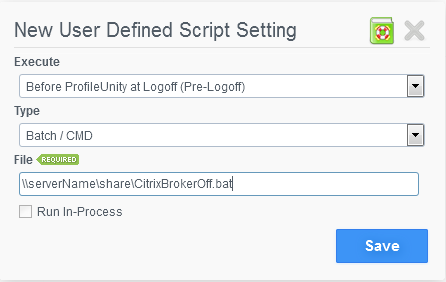
2. Please create a "User defined script" in the "Configuration Manager" that will run before ProfileUnity at logoff (per the image below).
NOTE: The scripts the Citrix "BrokerAgent" service which later starts when the VM is refreshed, so there is no need to start this service manually.
Product: ProfileUnity
Product Version: 6.0