
Problem:
A separate configuration needs to be executed either before, during, or after the existing configuration.
This can be useful in situations such as where a file needs to be unlocked before the main configuration executes, or another script needs to be run after execution.
Resolution:
1. Create a Dummy exe called PostLogon.exe. You can use a Bat to EXE converter to accomplish
Once created, save the postLogon.exe file to a sub-folder on your Netlogon\ProfileUnity share (this is the default location, but you can save it in any folder that allows read permissions for users).
Note: In this example the file was saved in %logonserver%\netlogon\ProfileUnity\Scripts to make sure it executes.
2. Editing the primary INI file
- Create a runonce key (using "Registry" module) and include the executable.
- Action: Write Value
- Hive: HKEY_CURRENT_USER
- Key: Software\Microsoft\Windows\CurrentVersion\RunOnce
- Type: REG_SZ
- Value: Fake
- Data: %systemroot%\system32\cmd.exe /c \\your_domain\netlogon\ProfileUnity\Scripts\postLogon.exe
- In a trigger module create a rule with the following values
- Type: "Application Open"
- Module: Application Launcher (Note: Any module can be specified. However, in this example Application Launcher will be used.)
- Application Name: postLogon.exe
- INI Path: \\yourDomain\NETLOGON\Profileunity\scripts\secondary.ini (advanced section - light blue tab)
NOTE: INI Path section indicates a location of the secondary INI file created later in this KB.
3. Editing Secondary INI file
Create a new 'manual configuration' (in this example it is called 'secondary').
This new configuration can do whatever you want (map a printer, remove a file lock, or execute a script. In the example below, an Application Launcher rule is used to create a script.
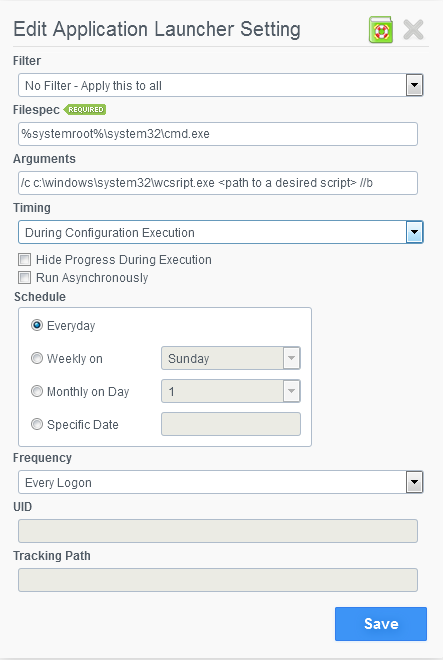
Example: Running a script in an alternate configuration
Filespec: %systemroot%\system32\cmd.exe
Arguments: /c c:\windows\system32\wscript.exe <path to a desired script> //b (NOTE: make sure users can read form the path specified)
4. IMPORTANT: Save the .INI file in a sub-folder to keep it separate from the primary INI.
That will prevent an execution of the primary INI every time the user logs in.
NOTE 1: The application will run elevated. This is the best way to workaround a problem. It is also a solution that will be supported with future versions of the product
NOTE 2: This solution will not work for Portability. Portability is run at logoff; therefore you would lose what ran initially at login.
Product: ProfileUnity
Product Version: 6.0+