
Problem:
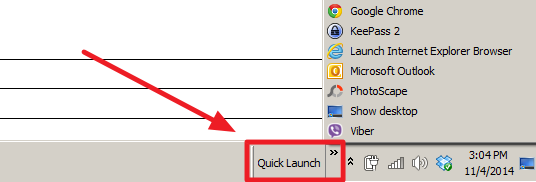
The Quick Launch (shown below) is captured by Profile Unity at Logoff. Therefore, if the user enables the Quick Launch, he/she will see the quick launch next time on a non persistent desktop.
However, this example shows how an administrator can control who will have the "Quick Launch" enabled by default.
In addition, the administrator can set certain items in the Quick Launch folder.
Symptoms:
no symptoms
Possible Resolution(s)
NOTE: This is not a ProfileUnity Feature, however, it is possible to enable the Quick Launch by editing certain registry keys.
1. Click on the "Configuration Management" and choose your configuration. Click on the "Registry" component.
2. Add a registry rule and add the following entries
Filter - No Filter - Apply this to all
Action - Add Value
Hive - HKEY_CURRENT_USER
Key - Software\Microsoft\Windows\CurrentVersion\Explorer\Streams\Desktop
Data Type - REG_BINARY
Value - TaskbarWinXP
Data - 0c000000080000000200000000000000aa4f2868486ad0118c7800c04fd918b400000000c00c000000000000260000000000000000000000260000000000000
Description - Quick Launch
Disabled - False

3. The rule should look like the rule shown above in a red square with a number 3 in the middle.
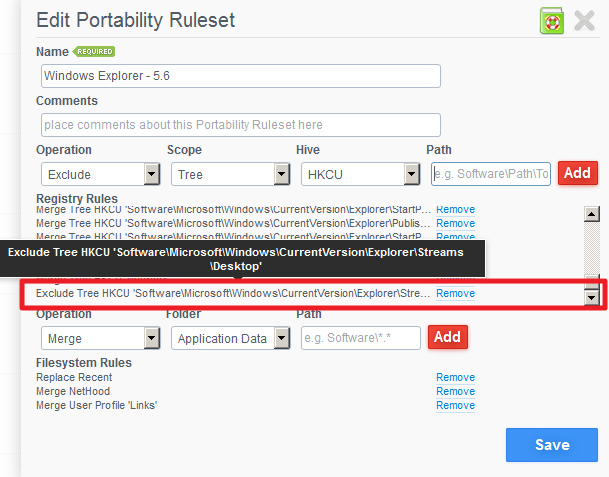
4. Exclude Quick Launch from being captured by portability rulesets.
Edit your Windows Explorer rule (in "Portability Management"), and write an Exclusion rule to ensure the following key is not captured in any Windows Explorer rule
Operation - Exclude
Scope - Tree
Hive - HKCU
Path - Software\Microsoft\Windows\CurrentVersion\Explorer\Streams\Desktop
5. In order to include particular items into a Quick Launch the administrator can copy the items form the network to a local directory where the Quick Launch is retrieving the icons form.
Create an App Launcher rule (an option in the configuration)
Filespec: xcopy.exe
Arguments: xcopy "\\server\path" "C:\Users\%username%\AppData\Roaming\Microsoft\Internet Explorer\Quick Launch" /d /y /r /k
NOTE: Please change the server path to the one used in your environment
Timing: During configuration execution
Schedule: Everyday
Frequency: Every Logon
Product: ProfileUnity
Product Version: 5.5 +