
Problem:
I need to move/copy data to a new location using ProfileUnity, than need new ProfileUnity configuration to use new Folder Redirected location. The environment is non-persistent desktops with Redirected Folders with "Copy to new location" or "No Change" settings.
Symptoms:
n/a
Possible Resolution(s):
To redirect and copy data from each folder following procedure needs to be done:
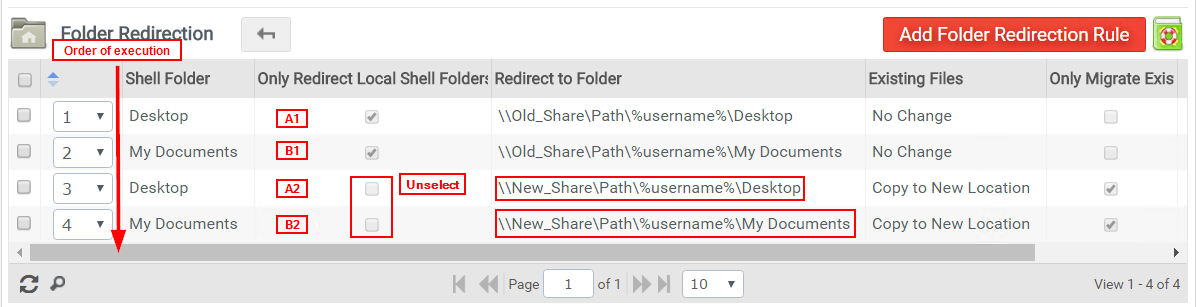
Step 1) Leave current Folder Redirection rule (A1) (for example Desktop) intact.
Note: If the folder redirection is applied by GPO than (A1) and (B1) entries in configuration can be omitted.
Step 2) Create second Folder Redirection rule (A2) (for example Desktop) with following settings:
Click "Advanced" settings
- Shell Folder: Desktop
- Unselect: Only Redirect Local Shell Folders
- Redirect to Folder: \\new_server\new_share\%username%\Desktop
- Existing files:
Option A) "No Change" (If new location have files copied manually earlier by 3rd party application like robocopy)
Option B) "Copy to New Location" (ProfileUnity will copy files during first logon)
Option C) "Move to New Location" (ProfileUnity will copy files during first logon)
- Select: Only Migrate Existing Files on Primary Client (This will make sure that this "Copy" or "Move" happens only once and not every logon.
- Save
Step 3) Verify that old Folder Redirection rule (A1) is earlier on the "Folder Redirection" list than new Folder Redirection rule (A2)
Step 4) Repeat creating more Folder Redirection rules for other redirected folders (My Documents etc)
Example:
Step 5) Update and download configuration to "...netlogon\profileunity\" directory
Step 6) To cleanup, after migration is over: Delete A1 and B1 etc. (Old Folder Redirection Rules)
Step 7) Update and download configuration to "...netlogon\profileunity\" directory
Note: With any major change the configuration needs to be tested with small sample of test users before deploying global configuration change.
Product: ProfileUnity FlexApp